The following texts were partially or completely generated with the help of generative AI models.
In this article, I want to demonstrate the different ways to store hierarchies in SAP HANA ((Of course, these are all general approaches that are possible in any database. However, in the evaluation at the end of the article, I will briefly touch on the hierarchy functions of SAP HANA.)). With the usual approaches for storing hierarchical data in a database, such as the parent-child data model or "flattening" into a table, you can use the hierarchy functions of SAP HANA. These provide convenient (but sometimes somewhat sluggish) access to a number of useful algorithms. But if you want to design high-performance access yourself, then this article shows a few alternative approaches to storing the hierarchical data.
I will cover the processing of these data models for hierarchies in SAP HANA and SQLScript in a later article.
Terminology for Hierarchies
Balanced and Unbalanced Hierarchies
A balanced hierarchy is an arrangement in which each level has a fixed meaning. This could be address data, for example. You can imagine it as a hierarchy with different levels:
- Level 1: Country (state)
- Level 2: Federal state
- Level 3: Municipality
- Level 4: Street
- Level 5: House number
- Level 4: Street
- Level 3: Municipality
- Level 2: Federal state
The opposite is, accordingly, an unbalanced hierarchy. Here, individual branches can have different numbers of levels. And the meaning of a level is not fixed. Typical examples are directory structures on a PC or the organizational chart of a corporation.
Designations of Nodes
We refer to the individual elements of a hierarchy as nodes. Depending on their properties, we distinguish the following types of nodes:
- Root node – the topmost node.
- Child node – the node below another node
- Parent node – the node above another node
- Sibling node – a node with the same parent node
- Leaf node – a node without child nodes
Data Models for Storing Hierarchies
Flattened: The Levels of Balanced Hierarchies as Columns of a Table
The levels of a balanced hierarchy are stored as columns with fixed semantics. For example, the address with the following columns:
- Country (state)
- Federal state
- Municipality
- Street
- House number
This means that one record is stored per leaf node. As a result, a certain amount of redundancy is accepted. For example, a municipality always lies in the same federal state. The advantage of this kind of storage is easy evaluation.
One disadvantage of this data model is that data can also be recorded incorrectly and inconsistently. For example, if a clerk makes a typo when recording an address, then a municipality of Mannheim might once lie in Baden-Württemberg and once in Bavaria. And if the hierarchy structure changes, which is of course rather unlikely in the case of addresses, then all affected records have to be adjusted.
Normalized: Each Level in Its Own Table
The alternative to the flat table is to use a separate database table for each hierarchy level. Each level is thus uniquely assigned to the level above it. An example from SAP's EPM or SHINE demo data model is, for instance, the sales orders:
- SNWD_SO - EPM: Sales Order Header Table
- SNWD_SO_I - EPM: Sales Order Item Table
- SNWD_SO_SL - EPM: Sales Order Schedule Line Table
- SNWD_SO_I - EPM: Sales Order Item Table
Each record in the tables has a GUID as a technical key in the NODE_KEY field. The link to the level above is established via the PARENT_KEY field.
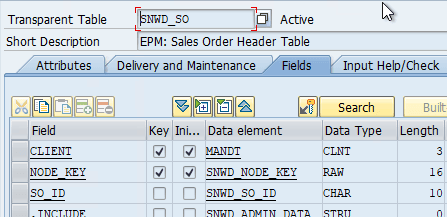
Header level
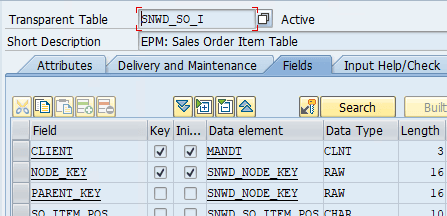
Item level
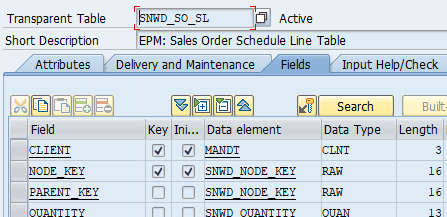
Schedule line level
Storage as Parent-Child (Adjacency List)
Unbalanced hierarchies are usually stored in the parent-child model. Here, the parent level is stored for each level. The top nodes themselves have no parent node. A generalization of the parent-child model is the adjacency list, which can be used to store any arbitrary graph. Since a hierarchy in graph theory corresponds to a directed tree with a root node, it can readily be stored in this format. The difference from the pure form of a "normal" adjacency list is that a node only appears once as a child and often also stores further attributes in the table.
A typical example of parent-child tables are the hierarchies in SAP BW. These are stored in the generated H tables of the InfoObjects. The hierarchy table of the profit center (InfoObject PROFIT_CTR), for example, looks like this:
- HIEID - (Key) Key of the hierarchy
- OBJVERS - (Key) Object version (
- NODEID - (Key) Key of the node as an integer. In this case, this is either a
- IOBJNM - InfoObject: The data type of the node.
- NODENAME - Semantic key of the node
- TLEVEL - Level of the hierarchy
- LINK - Flag for link nodes that represent a reference to another node
- PARENTID - Key (NODEID) of the parent node
- CHILDID - Key (NODEID) of the first child node, if present
- NEXTID - Key (NODEID) of the next sibling node, i.e. the one to its right, if present
- INTERVL - Interval flag
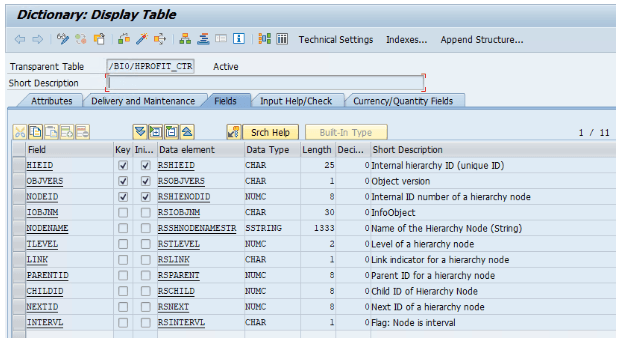
Hierarchy table /BI0/HPROFIT_CTR
This format goes beyond the usual parent-child hierarchies, since additional hierarchy information is stored. TLEVEL, CHILDID, and NEXTID must be populated when loading hierarchies. Unfortunately, SAP BW is very picky about the consistency of this information.
Storing Hierarchies in SAP HANA in the Nested-Set Model
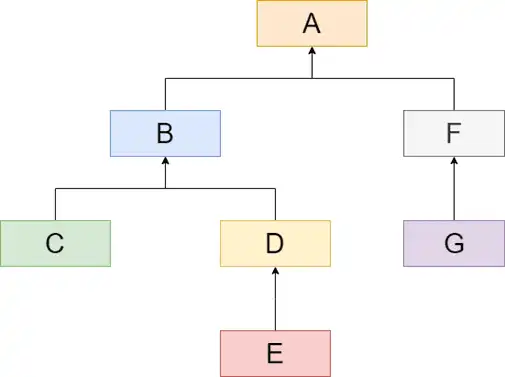
The nested-set model (in English also called modified preorder tree traversal or MPTT) considers a node in a hierarchy as the set of all nodes below it. These are, in turn, sets as well.
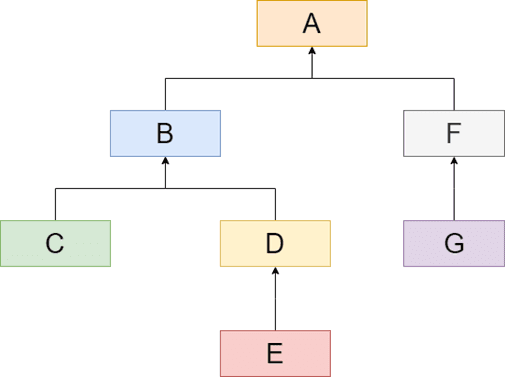
In the example on the right, this would mean:
- Set A contains sets B, C, D, E, F, and G
- Set B contains sets C, D, and E
- ... and so on
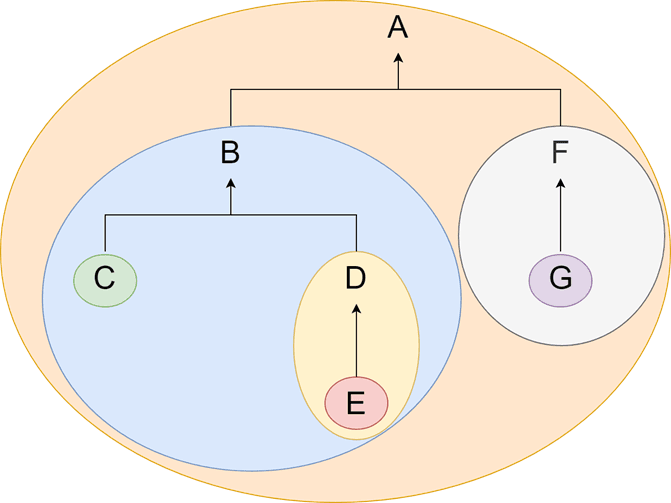
Without further ado, you can also represent the hierarchy as a set diagram, as you know it from school.
And these sets are now arranged along a line. This line has an entry and an exit point for each set. And these points are now numbered from left to right:
- Set A goes from 1 to 14
- Set B goes from 2 to 9
- Set C goes from 3 to 4
- ... and so on
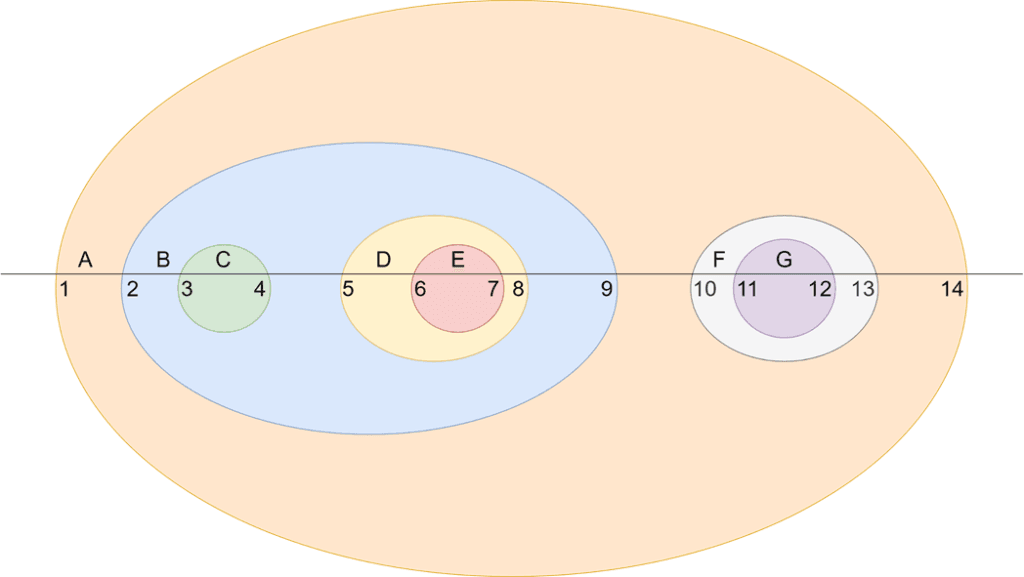
At first, the table does not look very intuitive. To recognize the structure, a human has to sketch it out. But this structure also has great strengths. Because some questions can be answered extremely quickly in this format.
I will describe the algorithms for creating and processing nested-set hierarchies in SAP HANA in another article.
Storage as a Resolved Hierarchy (Hierarchy Bridge Table)
Another, less intuitive approach is fully resolved hierarchies (hierarchy bridge table) ((Unfortunately, the English term is not intuitive, and there is no German term to be found in the literature. That is why I call this form "resolved hierarchies", since in my opinion it describes the matter well.)). These materialize all connections of a node to all subordinate nodes together with the depth. You can see the example in the table on the right.
This format has its main strength in the filtering of data. Since all parent-child relationships across X levels are resolved, you can very easily find all subordinate nodes via a JOIN.
| NODE | CHILD | DEPTH |
|---|---|---|
| A | A | 0 |
| A | B | 1 |
| A | F | 1 |
| A | C | 2 |
| A | D | 2 |
| A | G | 2 |
| A | E | 3 |
| B | B | 0 |
| B | C | 1 |
| B | D | 1 |
| B | E | 2 |
| C | C | 0 |
| D | D | 0 |
| D | E | 1 |
| E | E | 0 |
| F | F | 0 |
| F | G | 1 |
| G | G | 0 |
Storing Hierarchies as a Path
Last but not least, you can also write hierarchies in SAP HANA into a text field as a path. Just like a directory path or in a URL. At first, this does not look particularly elegant, but it is a relatively flexible format.
When searching for subordinate nodes, this format is even surprisingly fast.
Comparison of Storing Hierarchies in SAP HANA
Criteria for the Comparison
- Also for unbalanced hierarchies - the first data models can only store balanced hierarchies. Leaf nodes are always stored.
- No redundant data - Some data models for storing hierarchies in SAP HANA have redundant data. This requires storage space and must be kept consistent when changes occur. However, this often buys better performance.
- Effort for creation - In source systems, the hierarchy information is almost always available in flat tables or as a parent-child model. Accordingly, the other data models must first be generated. The effort for this varies greatly.
- Effort for changes - For some application scenarios, a hierarchy is never or very rarely changed. In that case, the cost of the change is not significant. In other scenarios, the hierarchy changes constantly. Accordingly, these operations must be possible quickly and easily.
- Performance - The most important question in reporting is: give me all children of node X. This is needed both when filtering on nodes and when aggregating values. Some data models are optimized for this one question.
- Support for the HANA hierarchy functions - SAP HANA has some handy SQL functions on board. These can be used in SQLScript or in the calculation views. For that, however, the hierarchies must be available in a suitable format.
| Data | Creation | Effort for changes | Performance | HANA | |||
|---|---|---|---|---|---|---|---|
| Also for unbalanced hierarchies | No redundant data | Effort for creation | Insert node | Move branch | All children of a node | Hierarchy functions and hierarchies in calc views | |
| Flat table with N columns | low | Leaf node: low | high | poor | Yes | ||
| Normalized with N tables | X | low | low | low | poor | Yes (via view) | |
| Parent-Child | X | X | low | low | low | poor (recursive) | Yes |
| Nested-set model | X | X | high | high | high | good | No |
| Resolved hierarchy | X | high | high | high | good | No | |
| Path as text | X | low | low | high | good | No |
Conclusion
The different formats for storing hierarchies in SAP HANA or in databases have various advantages and disadvantages. As long as there are no special requirements regarding report performance, you will probably always reach for the first three classic solutions. But it is also interesting to engage with the other data models. Especially when it comes to large hierarchies in reporting, quite a lot can be optimized here.