The following texts were partially or completely generated with the help of generative AI models.
Now let's get more concrete. We will tackle the topics we saw in the previous article about the problems with BEx exit variables step by step. To do so, I would first like to introduce a few terms that I will use in the following.
Terms
Logic
By a logic I mean an algorithm that is necessary to determine the value of a variable. A logic does not correspond 1:1 to a variable, because several variables often use the same logic, even if they differ in nuances. These nuances can be a parameter or a different reference variable. To break up this 1:1 assignment, a Customizing table for the assignment of variable to logic is a good option.
Reference variable
Many logics refer to another variable. We call this other variable a reference variable. In most implementations it is hard-coded as a literal in the source code. This is error-prone and you only see the actual dependencies when you look into the code. System fields such as SY-DATUM can also be regarded as reference variables. Extracting them from the code and capturing them in Customizing yields several positive effects:
- The dependencies can be presented transparently in a Customizing
- The logics can be reused for different reference variables
- For testing with unit tests, reference variables can be mocked
- An access method for reference variables can ensure uniform error handling
Parameter
Many logics can be generalized if you extract individual elements instead of cementing them as constants in the code. For example:
- Give me month X of the year
- Calculate Y days before the current date
I call these values for X or Y parameters. I would likewise like to move them out of the code into a Customizing.
Processing time
The processing time is ultimately controlled by the parameter I_STEP. If we want to use the same logic in different variables at different points in time, we must not query this hard-coded in the logics. Instead, this must also be moved into a Customizing.
The Customizing of the variable exits
The basic framework
Now the task remains to cleverly connect these different objects in Customizing:
- Variable -
VNAM - Logic - An ABAP class that implements the corresponding interface.
- Parameter - A single value. Or parameter-value pairs like URL parameters.
- Reference variable - A reference variable.
- Processing time PAI - A flag indicating whether the logic should be run at this point in time
- Processing time PBO - Ditto.
In the simplest case, we do this with a flat table and one entry for each variable. This limits us to one parameter and one reference variable per variable, which is completely sufficient in most cases.
The exception to the rule - now what?
The Customizing shown will certainly reach its limits at some point. There are always a few customer exit variables that are more special. For example, complex variables occasionally require several reference variables or parameters. It can also happen that you need different logic at the different points in time. This could be mapped with subordinate Customizing tables. But is that really necessary?
The KISS principle (Keep it simple, stupid!) states that you should only implement what you really need. And handling all possible and impossible cases with Customizing in advance enormously increases the effort and reduces acceptance among the users of a design pattern. That's why we hold back here and extend it later if necessary.
After all, our concept also has a "workaround" for these exceptions: you can program a class for exactly one variable, just as you would have done before....
The display
Searching for suitable variables should be as easy as possible. Because only in this way can you effectively prevent new variables with virtually the same function from being created over and over again. For this you need a simple interface that displays both the Customizing presented and the normal properties of the variables. There should be sufficient filter and sort functions so that you can quickly identify the suitable candidates.
The class structure
Implementation of the BAdI
We do not want to rely on the BAdI filters, but rather write our own branching for selecting the logic. But we still have to implement the BAdI once, precisely to accommodate our branching there. This happens in the class ZCL_VFW_BADI_IMP.
The logic that runs in the method IF_RSROA_VARIABLES_EXIT_BADI~PROCESS is very simple:
- Ask the static factory method
GET_INSTANCEof the classZCL_VFW_LOGIC_FACTORYfor the suitable instance for the logic - Call the logic instance with parameters
The factory class knows the Customizing and decides which class is chosen. If no logic is to be executed, an instance of ZCL_VFW_LOGIC_DUMMY is returned, which does nothing.
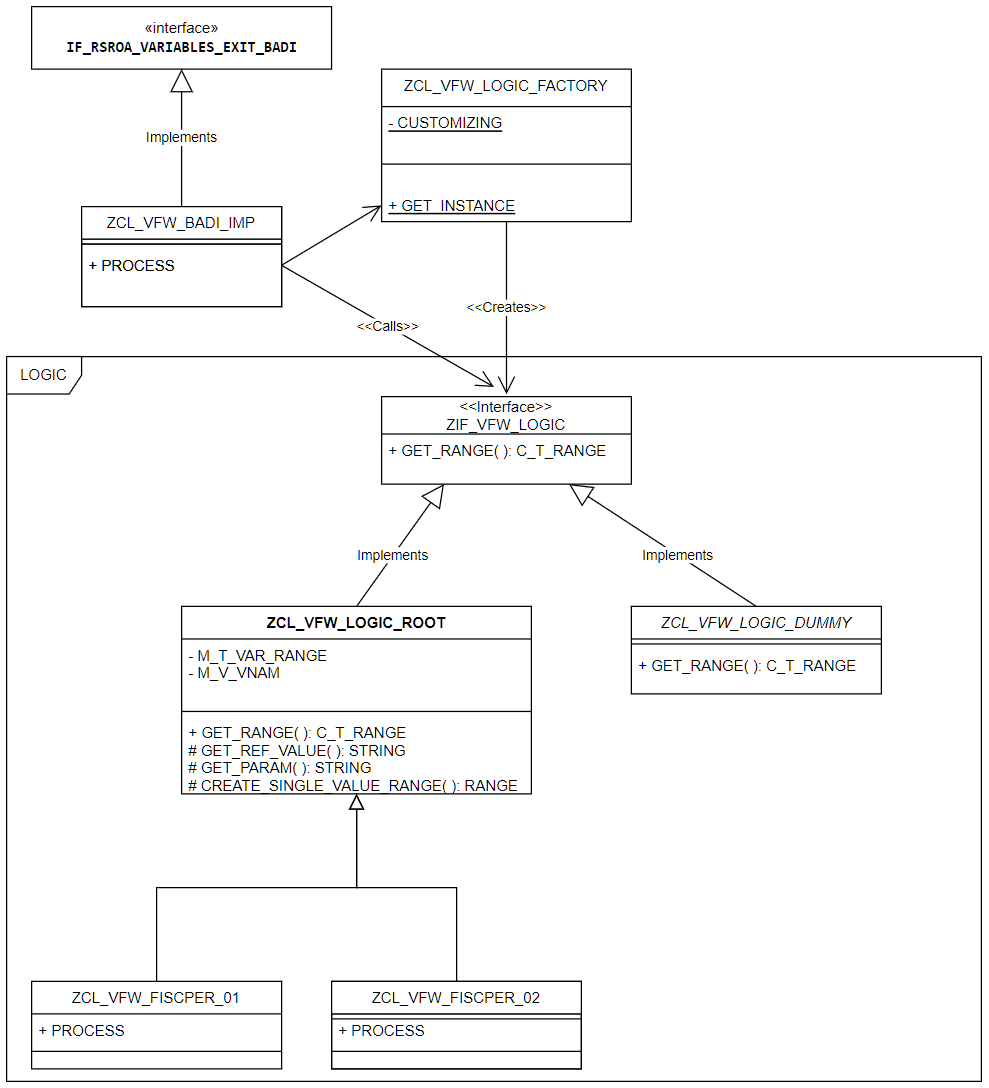
UML class diagram
The interface of the logic
In the UML class diagram I chose the name GET_RANGE for the method of the interface ZIF_VFW_LOGIC, on the one hand because it describes what this method is supposed to do, and on the other hand to make it clear that it is not 1:1 about the method PROCESS of the BAdI.
Cleaning up the parameter list
We do not want to include all the parameters of the BAdI in the signature. Instead, they are held in instance variables of the superclass of the concrete implementations. We obtain all the necessary information for implementing a variable exit via the following access methods - and classes:
- Values from other variables are addressed via an object of the class
ZCL_VFW_VARIABLE, which encapsulates the data of the reference variable in Customizing. This then provides us with the necessary data if required, and we don't have to mess around in the I_T_VAR_RANGE ourselves. With the method REF_VAR( ) we get the corresponding instance. - The parameters for our logic are provided by the method DEF_PARAM( )
The return of a variable exit consists either of the table RT_RANGE or of an exception to communicate error situations. This reduces the definition of the method GET_RANGE to the following:
    METHODS get_range RETURNING VALUE(rt_range) TYPE rsr_t_rangesid
                      RAISING zcx_vfw
                              cx_rs_error  .
To make implementation easier, we now also create a number of methods that we show in the following article. These are general and can, with some adaptation, also be used outside the framework.
The result of our logic is always a RANGE. To assemble it, we also inherit a few helpful methods from the superclass:
- CREATE_SINGLE_VALUE_RANGE( IV_VALUE ) - This is the most common case: exactly one value is to be returned. By default INCLUDE/EQ
- CREATE_SINGLE_INTERVAL_RANGE( IV_LOW, IV_HIGH) - Creates an interval (BT), by default with INCLUDE
- CREATE_MULTI_VALUE_RANGE( IT_VALUES ) - Creates a list with values. By default with INCLUDE/EQ
With these three methods we already cover well over 95% of the cases. And now let's take a look at a simple example with them. A very typical picture for a simple exit variable:
"Classic" exit
CASE I_VNAM.
  WHEN '<Variable 1>'.
    IF I_STEP = 2.

* Determination of end date from selection for <Variable 2>
      READ TABLE I_T_VAR_RANGE INTO LS_VAR_RANGE WITH KEY VNAM = '<Variable 2>'.
      IF SY-SUBRC = 0.
        CLEAR L_S_RANGE.
        L_S_RANGE-SIGN = 'I'.
        L_S_RANGE-OPT = 'EQ'.
        L_S_RANGE-LOW = LS_VAR_RANGE-HIGH.
        APPEND L_S_RANGE TO E_T_RANGE.
      ENDIF.
    ENDIF.
Alternative with access methods
The same logic becomes much simpler with the access methods. Notice that some information is missing here.
DATA(lv_ref_high) = ref_var( )->get_high_value( ).
e_t_range = create_single_value_range( lv_high ).
What is no longer in the code:
- For which variable should the exit be executed?
- At which point in time should the exit be run?
- What is the name of the variable that should be read from?
This information is no longer in the code, but is defined via Customizing.