The following texts were partially or completely generated with the help of generative AI models.
With the latest BW/4HANA 2023 CAL system, there is an ugly problem: If you want to create a project from Eclipse (aka SAP HANA Studio) using the ADT or the BW Modeling Tools, you get an error message. With the SAP GUI, everything works without any issues.
The symptom in Eclipse
The error message shown when creating a project depends a bit on the version used:
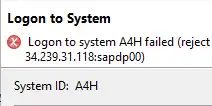
- Eclipse 2023-09: Logon to system A4H failed

- Eclipse 2024-06: Logon to System A4H failed (reject connection request from Rechnername:eclipse to IPAddress:sapdp00 )

Unfortunately, this error message isn't very helpful. Except for googling! In general (though not the root cause), it's worth updating to the latest Eclipse version and the matching add-on versions. Then you at least get the better error message. ;-)
The solution
While googling, I came across this answer in the SAP Forum: Logon to system A4H failed
The short version:
- Log on with the SAP GUI
- Transaction
SMGW - Menu Goto==>Expert Functions=>External Security==>Maintain ACL Files
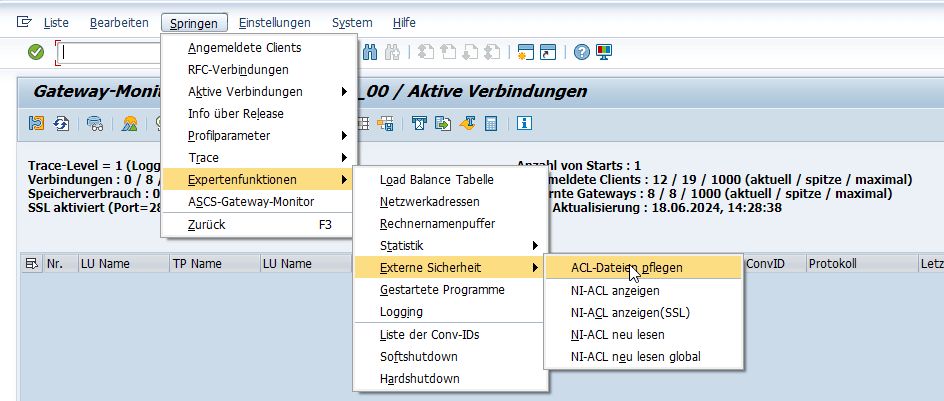
- Select the
Prxyinfo Filetab - Highlight the last line
- Button Add, Default
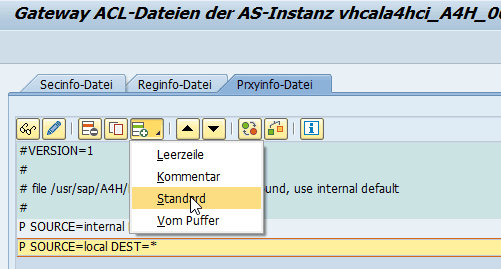
- Enter the following entry:
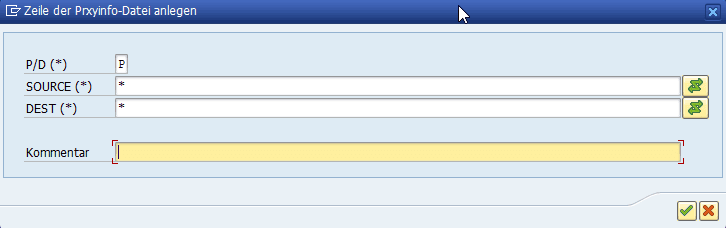
- The result:
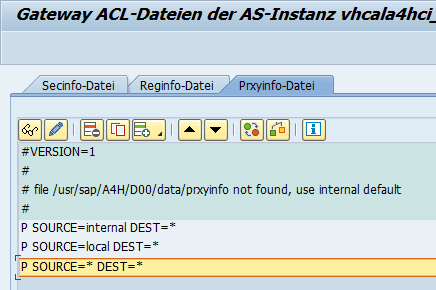
- Save and activate globally.
Conclusion
It's really embarrassing on SAP's part that you can't simply access a CAL system running BW/4HANA from Eclipse or the BW Modeling Tools. This is currently the only possible development environment. Once again, probably nobody tested it in the role of a customer. Maybe it would have worked from the Windows Remote Desktop. But Eclipse wasn't running there. That's why I always use my own local Eclipse.
I wrote this article because I couldn't find a solution quickly and only found something on Google once I had the extended error message. I hope SAP fixes this soon, and that until then this guide gets found often.